
Appearance
Connect Razorpay
Razorpay gives you the widest method coverage of any RelyPay provider — UPI, Cards, Net Banking, Wallets, Pay Later, EMI and PayPal. This guide walks through connecting it on the Addons → RelyPay → Providers page.
No Razorpay account yet? Sign up for Razorpay to get your API keys.
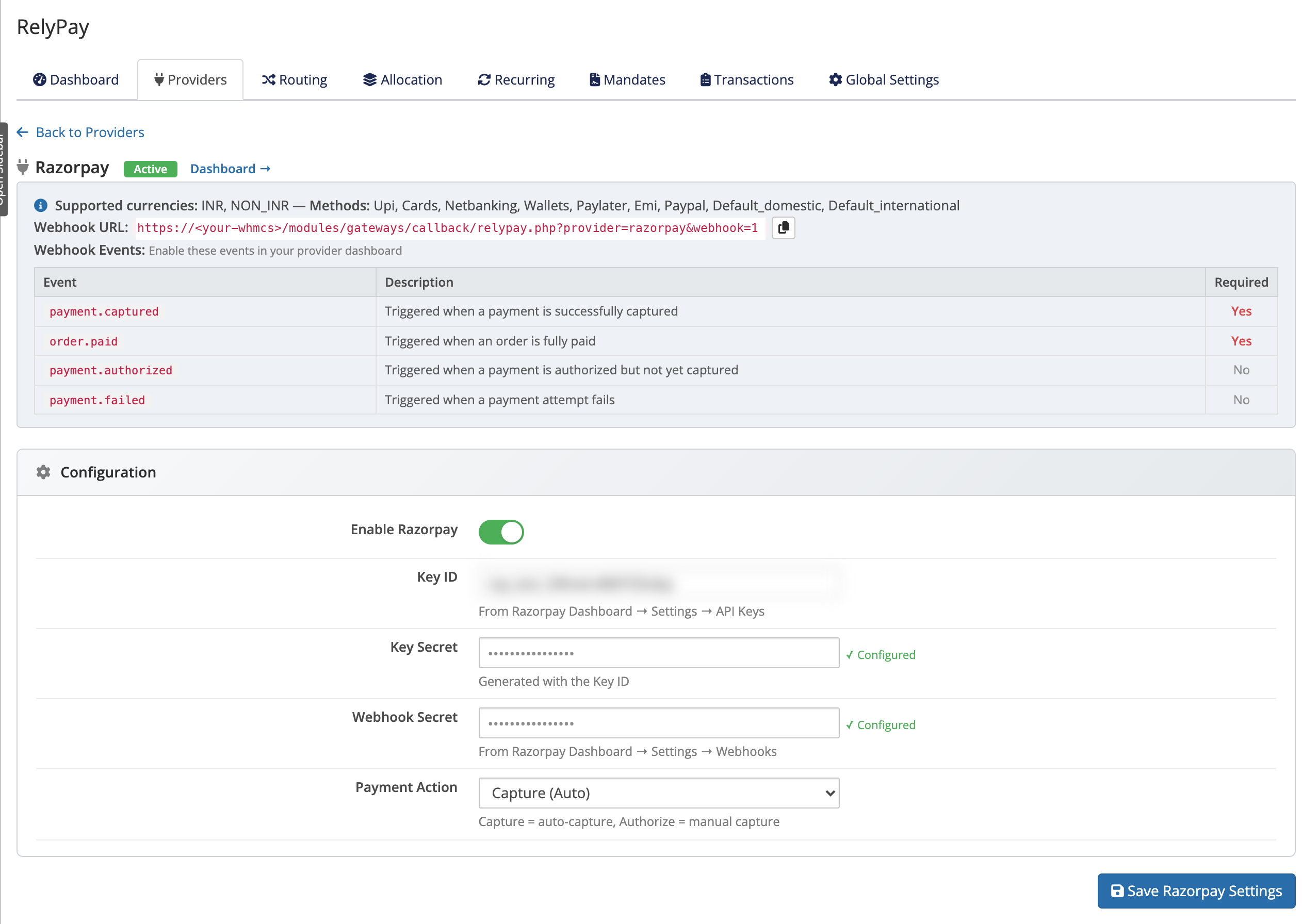 Addons → RelyPay → Providers → Razorpay
Credentials you will need
On the Razorpay card, fill in these fields exactly:
| Field | Where to find it |
|---|---|
| Key ID | From Razorpay Dashboard → Settings → API Keys |
| Key Secret | Generated with the Key ID |
| Webhook Secret | From Razorpay Dashboard → Settings → Webhooks |
Generate your API keys in the Razorpay Dashboard first, then copy the Key ID and Key Secret into RelyPay. You will create the Webhook Secret in the next step, when you register the webhook.
Payment Action
- Payment Action — choose Capture (Auto) or Authorize Only. Capture = auto-capture, Authorize = manual capture.
Leave this on Capture (Auto) unless you specifically want to authorise a card at checkout and capture the funds later yourself. Most stores want auto-capture so paid invoices settle immediately.
Register the webhook
- On the Razorpay card in RelyPay, copy the webhook URL shown.
- In Razorpay Dashboard → Settings → Webhooks, add a new webhook and paste that URL.
- Set a secret on the webhook, then copy it back into the Webhook Secret field in RelyPay so callbacks can be verified.
- Subscribe to these events:
| Event | Required? |
|---|---|
payment.captured | Required |
order.paid | Required |
payment.authorized | Optional |
payment.failed | Optional |
SSL required
The webhook URL must be HTTPS. Razorpay will not deliver events to an insecure endpoint, and RelyPay verifies each callback's signature against your Webhook Secret.
Test mode
Razorpay provides separate Test and Live API credentials:
- Sandbox testing: Enter test-mode Key ID and Secret during staging.
- Production cutover: Replace with live keys and update your Webhook Secret when accepting real payments.
Test it
- Click Test Connection on the Razorpay card to confirm your keys reach Razorpay.
- Enable Razorpay and save.
- Place a test payment through a RelyPay sub-gateway that Razorpay can serve, and confirm the result appears in the transaction log with Razorpay as the provider.