
Appearance
Allocations
Allocations control which sub-gateways a given customer sees at checkout. Routing decides the provider behind a payment; allocations decide the set of checkout options a customer is even offered. You manage them under Addons → RelyPay → Allocation.
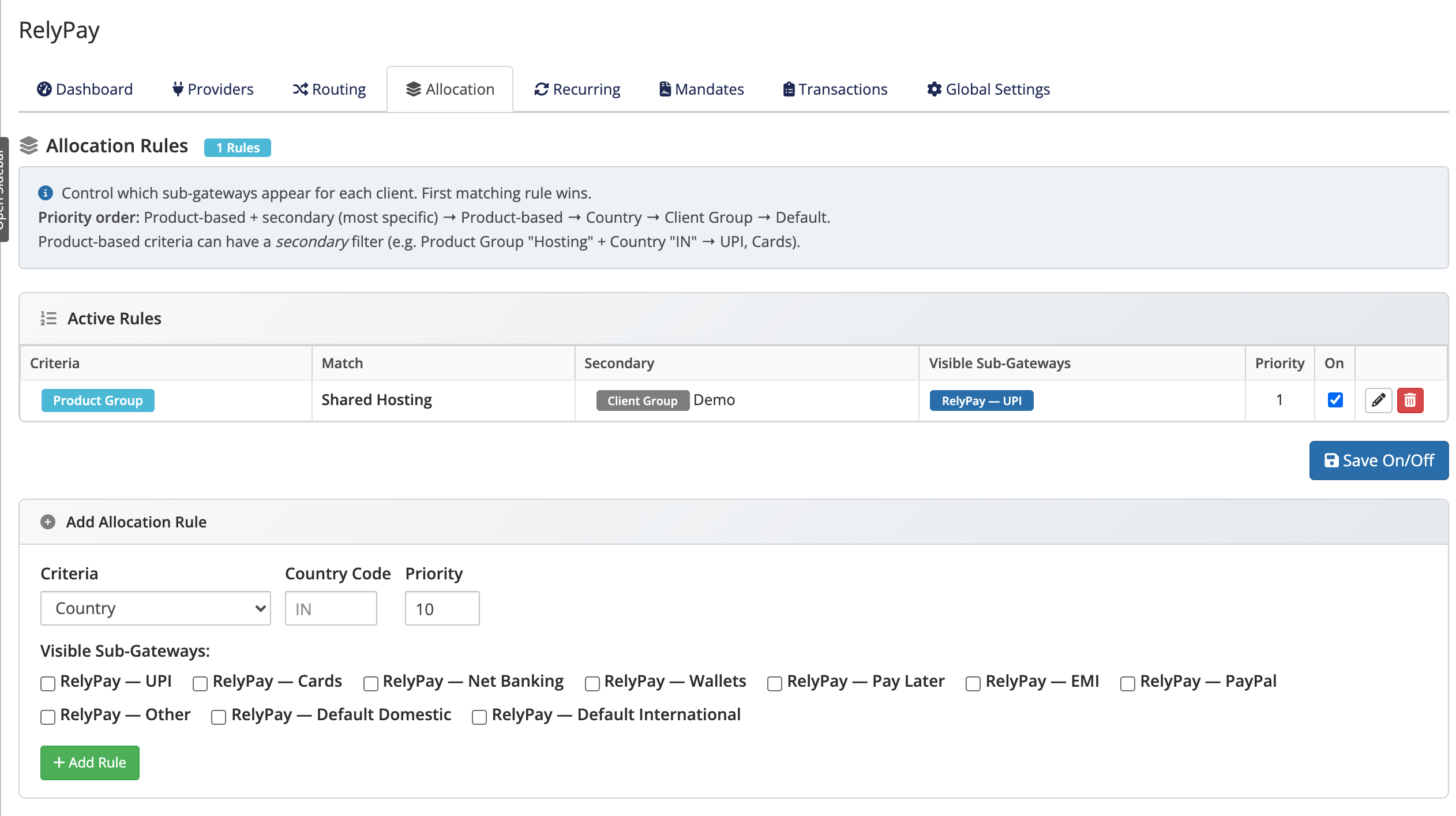 Addons → RelyPay → Allocation
How visibility works
Each allocation rule lists the sub-gateways that remain visible to the customers it matches. If no rule matches an order, every sub-gateway is visible — the screen's empty state reads:
No rules. All sub-gateways visible to all clients.
The default behavior exposes all active gateways:
- Filtering logic: Each rule restricts visibility to explicitly selected sub-gateways.
- Exclusion model: A rule hides omitted gateways without altering underlying gateway availability.
Criteria you can build a rule on
A rule targets customers using one of:
- Country
- Client Group
- Product Group
- Config Option Group
- Product Addon
- Product Bundle
Product-based rules (Product Group, Config Option Group, Product Addon, Product Bundle) can add an optional secondary filter — such as Country or Client Group — for finer targeting, for example "customers in the UK buying the Reseller plan".
First-match order
When several rules could apply, RelyPay evaluates them in this order and the first match wins:
- Product-based rule with a secondary criterion
- Product-based rule
- Country
- Client Group
- Default — all sub-gateways visible
This means your most specific rules take precedence, and anything not covered falls through to "show everything".
A worked example
Suppose you want Indian customers to see UPI, Cards and Net Banking, but international customers to see only Cards and PayPal:
- Add a Country rule for India listing RelyPay — UPI, RelyPay — Cards and RelyPay — Net Banking.
- Add a Country rule for your international markets listing RelyPay — Cards and RelyPay — PayPal.
Any customer not matched by either rule still sees every sub-gateway, so nobody is ever left without a way to pay.
Allocations only affect visibility
Allocation controls payment method visibility without blocking checkout:
- Visibility filter: Only hides or reveals sub-gateways based on configured matching rules.
- Fail-open safeguard: If license verification is unavailable, visibility filtering disengages and exposes all enabled gateways so checkouts never fail.
Related pages
- Routing — which provider takes each payment
- Sub-gateways — the checkout options a rule shows or hides
- Troubleshooting — what to check if a method is missing for a customer