
Appearance
GST Manager for AcelleMail
GST Manager delivers Indian GST compliance natively within the AcelleMail admin interface:
- Automated classification: Categorizes transactions into B2B-intra, B2B-inter, B2C, or Export.
- Dynamic tax splitting: Calculates and applies CGST + SGST or IGST based on location rules.
- Statutory invoice PDFs: Generates branded Tax Invoices with SAC codes, GSTINs, and bank blocks.
- GSTR-1 filing reports: Exports formatted CSV files ready for GST portal submission.
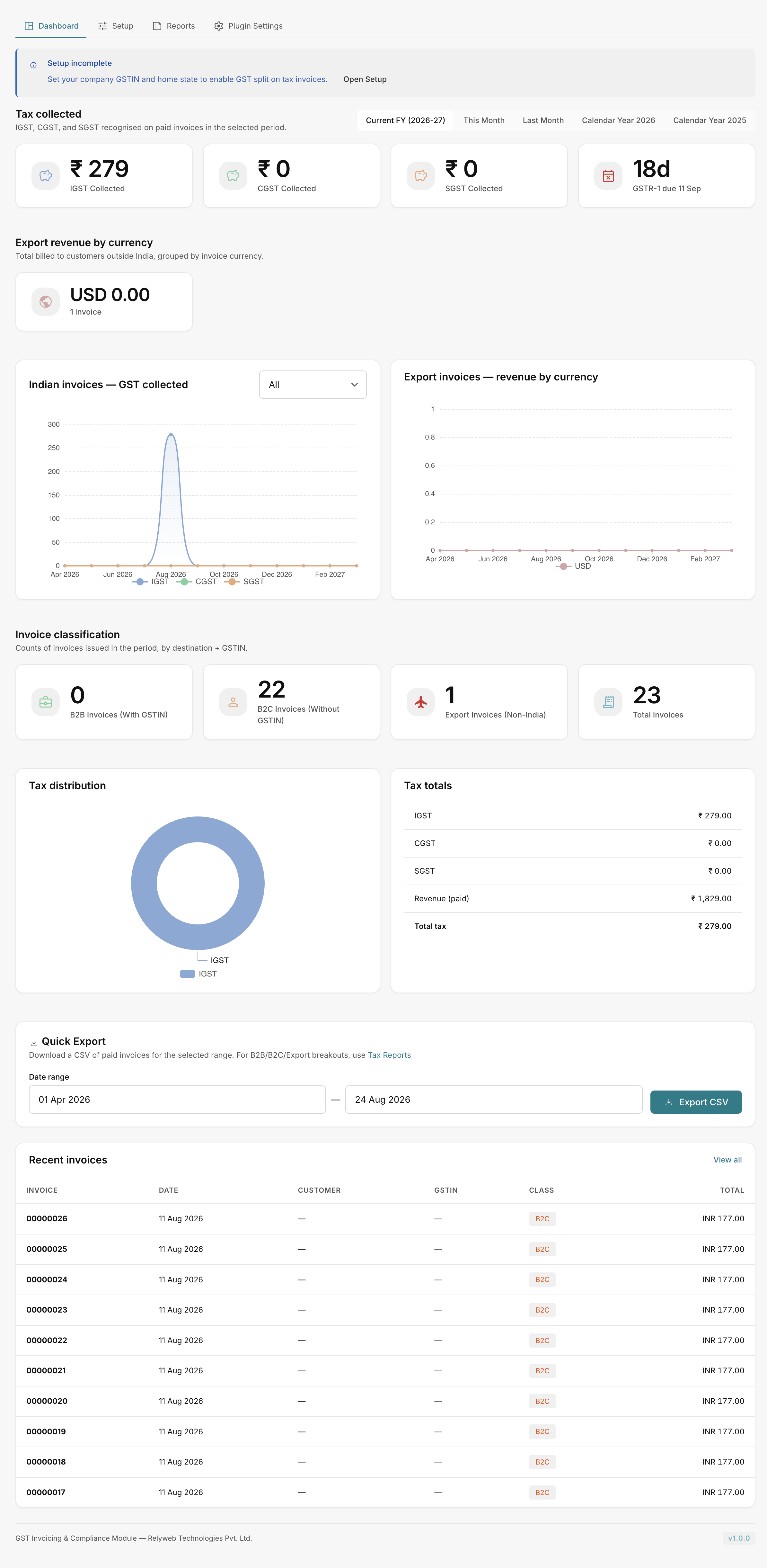 GST Manager → Dashboard
Statutory terminology reference
- GST / GSTIN: Goods and Services Tax / 15-character GST Identification Number.
- CGST / SGST / IGST: Central GST / State GST / Integrated GST components.
- SAC Codes: Service Accounting Codes classifying service offerings.
- B2B / B2C: Business-to-Business (with customer GSTIN) / Business-to-Consumer (without GSTIN).
Target audience and requirements
Built for Indian businesses running AcelleMail 4.2+ needing:
- Automated inter-state vs intra-state tax calculations.
- Compliant GST invoice generation.
- FEMA-compliant export invoice handling.
- Structured GSTR-1 return data exports.
Core capabilities
| Area | Feature Overview |
|---|---|
| Tax Engine | Automated classification for B2B, B2C, and Export transactions with real-time tax component calculation. |
| Invoice Engine | Customized PDF templates featuring merchant logo, SAC table, tax splits, and per-currency bank accounts. |
| Compliance Reports | GSTR-1 (B2B & B2C), Export turnover, and all-in-one transaction CSV exports by date range. |
| Reconciliation | Interactive dashboard with tax liability totals, export metrics, charts, and GSTR-1 countdown timer. |
| Audit Controls | 15-character GSTIN format validation, custom EXP-YYYY-N sequences, and statutory FEMA declarations. |
| System Integrity | Advisory HMAC-SHA256 file-integrity checks, automated pre-update backups, and one-click rollbacks. |
Application structure
The plugin adds a dedicated GST Manager navigation entry in the AcelleMail sidebar:
- Dashboard: Compliance overview, tax metrics, and filing countdown.
- Setup: Merchant GSTIN, tax defaults, SAC codes, branding, and bank accounts.
- Reports: Date-filtered GSTR-1, export, and ledger CSV downloads.
- Plugin Settings: License management, file integrity, updates, and database snapshots.
License activation requirement
Access to Dashboard, Setup, and Reports remains locked until an active license key is activated under Plugin Settings → License. See Licensing.
Next steps
- Requirements — verify server dependencies and ionCube Loader
- Installation — upload, activate core hooks, and register license
- Configuration — configure merchant GSTIN, default tax, and banking
- Tax reports — download filing CSVs
- Settings reference · Error reference