
Appearance
Settings reference
Complete configuration reference for GST Manager:
- System Setup: Invoice layout, GSTIN, tax rules, SAC codes, and remittance details (Addons → GST Manager → System Setup).
- Global Settings: Template synchronization, updates, backups, and licensing (Addons → GST Manager → Global Settings).
- Setup Guide: Step-by-step onboarding walkthrough in Configuration.
Quick vocabulary
- GSTIN: 15-character statutory GST registration number.
- IGST / CGST / SGST: Inter-state / central / state tax components.
- SAC Codes: Classification codes for services.
- Purpose Codes: RBI codes for incoming foreign export remittances.
- FEMA: Foreign Exchange Management Act.
System Setup
Invoicing
Controls invoice generation rules and numbering sequences.
| Field | What it does | Default |
|---|---|---|
| Proforma Invoicing | Issues proforma invoices until paid — required for GST-correct sequencing | Enabled |
| Sequential Numbering | Gives every invoice a continuous number, e.g. INV-20251001 | Enabled |
Why these matter
GST expects gap-free, sequential invoice numbers. Enabling both keeps your numbering compliant without manual tracking.
Tax & GST
Captures tax identity and generates automated GST rate calculations.
| Field | What it does | Default |
|---|---|---|
| Tax Type | The GST tax model applied to invoices | GST |
| GSTIN | Your 15-character GST registration number (validated) | (none — you must enter it) |
| Registered state | The state your GSTIN belongs to; decides CGST/SGST split | (none — you must select it) |
| Generated: IGST | 18% rule for inter-state supplies (country = India) | 18% |
| Generated: CGST | 9% rule for supplies within your registered state | 9% |
| Generated: SGST | 9% rule for supplies within your registered state | 9% |
GSTIN is mandatory
GST Manager will not calculate tax correctly without a valid 15-character GSTIN and a registered state. This is the one setting you cannot skip.
SAC & Purpose Codes
Defines default Services Accounting Codes (SAC) and RBI Purpose Codes per category:
| Service type | Carries |
|---|---|
| Hosting (Shared/VPS) | Default SAC + Purpose code for hosting services |
| Product Upgrades | Default SAC + Purpose code for upgrades |
| Domains | Default SAC + Purpose code for domain services |
| Addons | Default SAC + Purpose code for add-on products |
Configure product-level overrides under Item Rules.
Footer & Identity
Configures corporate identification details stamped on invoice footers:
| Field | What it does | Default |
|---|---|---|
| Phone | Contact phone shown in the footer | +91-1234567890 (placeholder) |
| Contact email shown in the footer | (sample placeholder) | |
| PAN | Your Permanent Account Number | ABCDE1234F (placeholder) |
| CIN / LLPIN | Company or LLP identification number | (sample placeholder) |
Replace the placeholders
Skipping this section leaves the sample placeholders on real customer invoices. Always set your own values.
Bank Details
Configures multi-currency remittance accounts:
- Per-currency mapping: Add separate banking instructions for INR, USD, EUR, or GBP.
- Account parameters: Stores bank name, account number, IFSC code, SWIFT/BIC, and payment notes.
- Dynamic display: Invoices render the bank details matching their billed currency.
License-gated on the client area
The bank details shown on the client-area invoice view require an active license. The check runs locally, so a brief licensing-server outage won't switch it off; if the license is genuinely inactive, the bank details simply stop showing until a successful check.
Export Settings
Controls compliance parameters for international non-Indian clients:
| Field | What it does | Default |
|---|---|---|
| FEMA declarations | The FEMA/export declarations printed on export invoices | (sample text) |
| Export numbering | Export-specific sequential invoice numbering | Enabled |
| Export formatting | Formatting applied to export invoices | Standard |
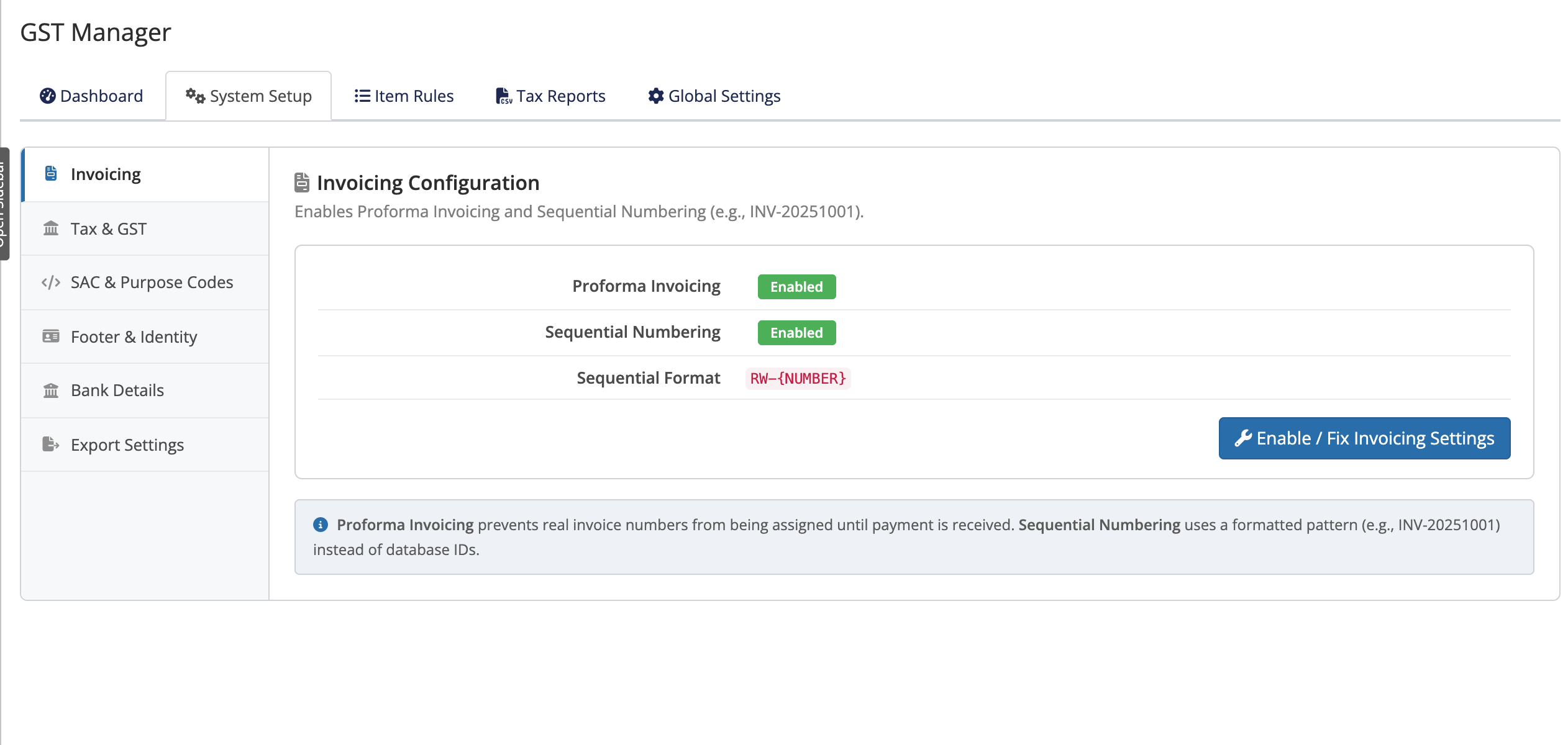 Addons → GST Manager → System Setup
Global Settings
Sync Status
Manages theme PDF template deployment (invoicepdf.tpl and invoicepdffooter.tpl):
| Field / control | What it does | Default |
|---|---|---|
| Auto-Sync | Auto-deploys templates to themes when a mismatch is detected on admin page load | Enabled |
The Theme Sync Status table displays theme synchronization:
| Column | Shows |
|---|---|
| Theme | The WHMCS theme name |
| Status | Whether the theme's templates are in sync |
| invoicepdf.tpl | Sync state of the invoice body template |
| invoicepdffooter.tpl | Sync state of the invoice footer template |
| Actions | A per-theme Sync action |
Click Sync All to overwrite templates across all themes. See File Integrity.
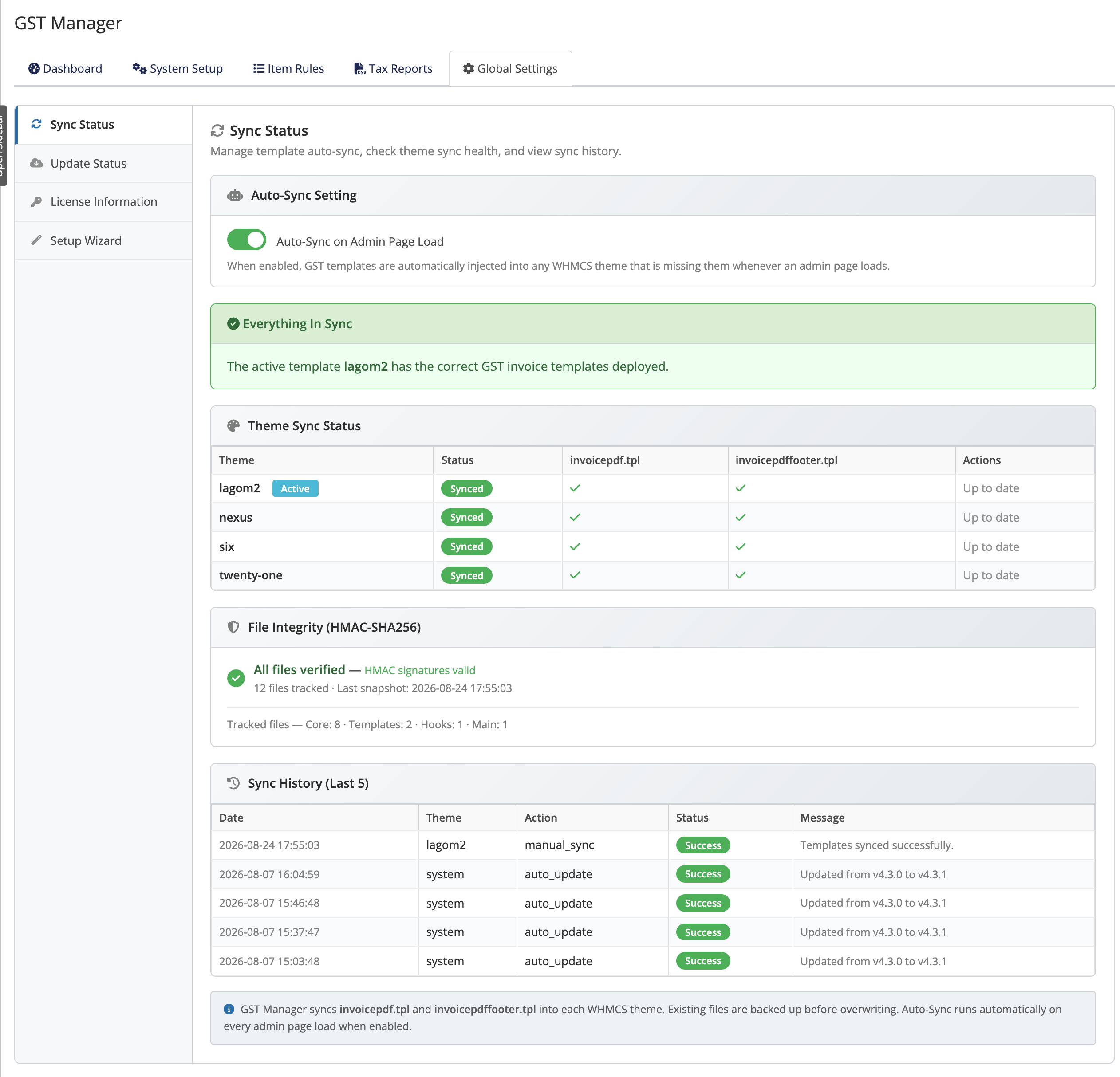 Addons → GST Manager → Global Settings → Sync Status
Update Status
Provides automated one-click updates with rollbacks:
| Control | What it does |
|---|---|
| Current Installation | The installed version |
| Check for Updates | Checks for a newer release (also checked automatically once a day) |
| Update Now | Downloads, backs up first, applies, then reloads |
| Database Backups | List of retained database backups with Download |
See Updating for full update workflows.
License Information
Manages licensing and maintenance entitlements:
| Field | What it does |
|---|---|
| License key | Enter and manage your license key |
| License type | Shows the detected type (Leased or Lifetime) |
| Support & Updates | For Lifetime licenses, whether the entitlement is active and until when |
See Licensing for license model differences.
Setup Wizard
Resume or re-run the initial onboarding wizard:
| Control | What it does |
|---|---|
| Continue Setup | Reopens at the first outstanding step, keeping everything already done |
| Start Over From Step 1 | Walks through all steps from the beginning |
Neither option resets saved settings — fields are pre-filled with current configuration.
Related pages
- Configuration — the setup walkthrough
- File Integrity — HMAC-SHA256 verification
- Updating — updates and backups
- Licensing — license types and entitlements
- Back to the overview