
Appearance
Handle export invoices
Manage compliance requirements for invoices issued to clients outside India:
- FEMA compliance: Embeds statutory declarations for cross-border export supplies.
- Export series: Separates international invoice numbers from domestic billing.
- Multi-currency banking: Maps foreign currency bank instructions (USD, EUR, GBP) to invoices.
- Statutory reporting: Generates audit-ready CSV exports containing Purpose and SAC codes.
Terminology
- FEMA: Foreign Exchange Management Act regulating foreign remittances.
- Purpose Code: RBI code classifying foreign inward remittances.
- SAC: Services Accounting Code identifying billed services.
1. Configure Export Settings
Navigate to Addons → GST Manager → System Setup → Export Settings:
- FEMA declarations: Enter statutory compliance text for international service exports.
- Export-specific numbering: Enable a distinct sequential numbering series for export invoices.
- Export formatting: Configure visual layouts and currency symbol presentation.
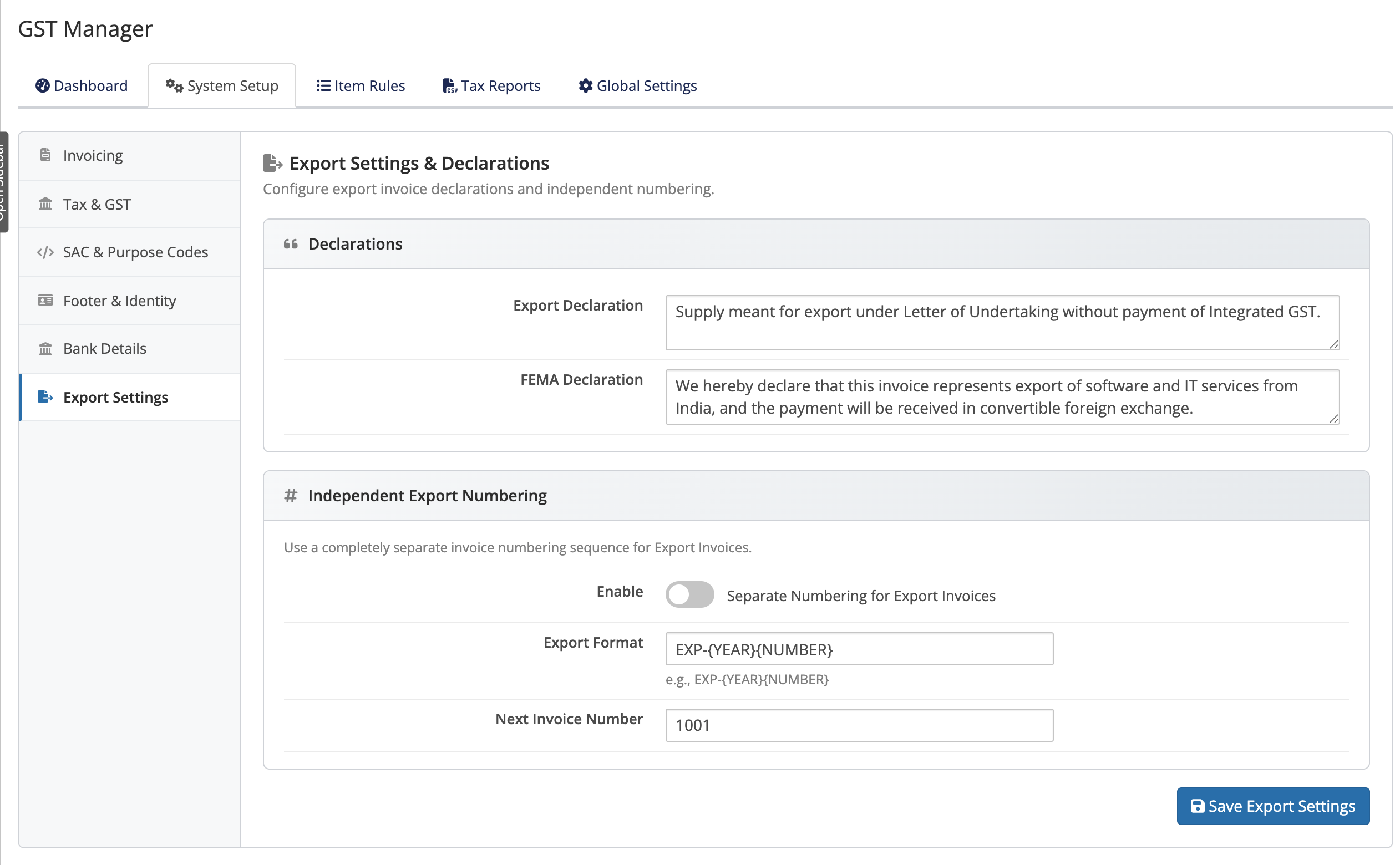 Addons → GST Manager → System Setup → Export Settings
2. Set per-currency bank details
Configure currency-specific bank accounts under System Setup → Bank Details:
- Domestic accounts: Provide INR bank details with IFSC codes.
- Foreign currency accounts: Add international SWIFT/BIC, IBAN, and intermediary routing for USD, EUR, or GBP invoices.
3. Configure SAC and Purpose codes
Assign classification codes across products:
- Global defaults: Set category baselines under System Setup → SAC & Purpose Codes (Hosting, Upgrades, Domains, Addons).
- Product overrides: Map custom product codes under Addons → GST Manager → Item Rules.
Why this matters
Missing SAC or Purpose codes make an export invoice non-compliant and leave gaps in your export report. Setting sensible defaults once means every future export invoice is complete.
4. Download the Export Invoices CSV
Export compliance records for foreign currency transactions:
- Open Addons → GST Manager → Tax Reports.
- Select your reporting date range.
- Click Download Export Invoices CSV.
The generated CSV contains paid non-Indian invoices with line-item Purpose Codes and SAC codes.
Domestic vs export
This report is exports only. Indian clients' paid invoices belong in your GSTR-1 data. The Legacy GST Report combines both if you need a single file.
Related pages
- Export compliance — FEMA and export details
- Tax reports — the Export Invoices CSV
- Brand your GST invoices — bank details