
Appearance
Settings reference
Everything you configure lives under RelyAI → Settings. A left rail lists nine tabs; this page covers what each controls, its key fields, and its defaults.
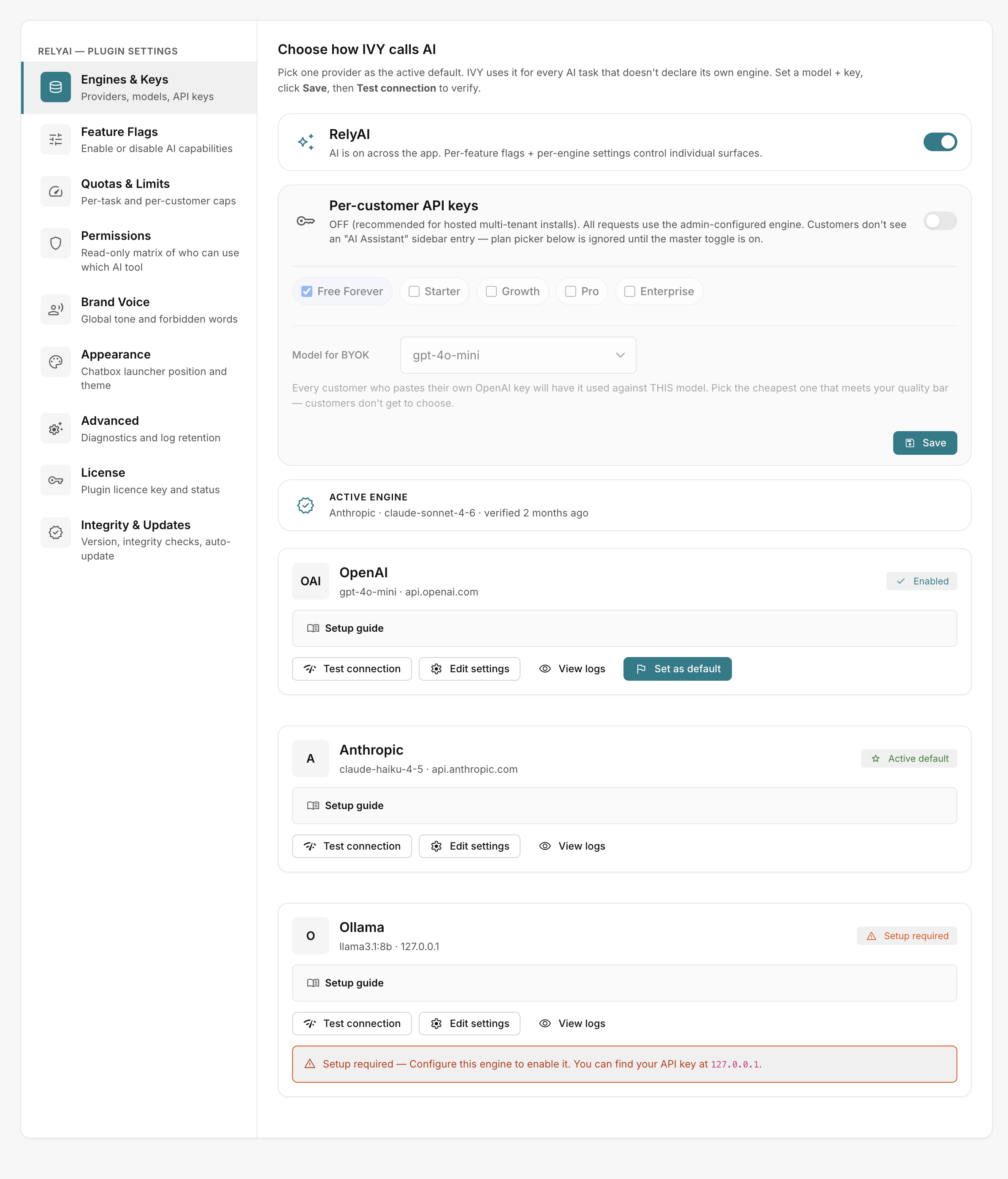 RelyAI → Settings
The nine tabs at a glance
| Tab | What it controls |
|---|---|
| Engines & Keys | Providers, models, API keys |
| Feature Flags | Enable or disable AI capabilities |
| Quotas & Limits | Per-task and per-customer caps |
| Permissions | Read-only matrix of who can use which AI tool |
| Brand Voice | Global tone and forbidden words |
| Appearance | Chatbox launcher position and theme |
| Advanced | Diagnostics and log retention |
| License | Plugin license key and status |
| Integrity & Updates | Version, integrity checks, auto-update |
Engines & Keys
The AI providers and models RelyAI calls.
| Field | Notes |
|---|---|
| Name | Label, e.g. "OpenAI GPT-4o" |
| Provider | OpenAI, Anthropic or Ollama |
| Model | Model ID for that provider |
| Max Tokens | Response length ceiling |
| API key | Placeholder sk-… / sk-ant-… / (leave blank for Ollama); editing shows "Leave blank to keep the existing key" |
- Test Connection: Validates credentials ("Testing…" → "Connection successful").
- Default engine: Sets the primary engine for all AI operations.
- Customer BYOK: Enable Allow customers to use their own API key to allow user-supplied keys.
See Connect an engine.
Feature Flags
Independent on/off toggles for each capability:
- Enabled by default: Support chatbox, universal rewrite, subject A/B, and observability surfaces.
- Disabled by default: Agent chat, all coaches, automations, and destructive campaign/template tools.
- Observability: Disabling observability tabs hides UI views without stopping backend logging.
See Feature flags and permissions.
Quotas & Limits
| Cap | Default |
|---|---|
| Per-task rate | 20/minute, 500/hour |
| Per-customer daily | 0 = uncapped |
Provider-side rate limits are also respected. See Quotas, limits and credits.
Permissions
Displays a read-only matrix of tool access per user role:
- Introspection only: Reflects existing AcelleMail permissions without modifying them.
- Customer view: Provides a View my permissions modal for end users when enabled.
Brand Voice
Global copy rules applied to rewrite and generated text.
| Field | Default |
|---|---|
| Tone adjectives | warm, witty, confident, plain-spoken |
| Forbidden words | synergy, leverage, click here, free!! |
| Voice sample | (empty) |
Settings resolve per-user, then global, then a built-in default. See Brand voice and appearance.
Appearance
Style the chatbox launcher.
| Field | Default | Other options |
|---|---|---|
| Launcher position | bottom-right | top-right, in the top bar, beside search |
| Color theme | pastel violet | teal, orange, green, indigo |
| Launcher glyph | sparkles | chat bubble, magic wand, star, helper, bolt, brain, robot, concierge, forum |
| Unread-dot animation | pulse | static, hidden |
Advanced
Advanced system tuning and runtime parameters:
- Logging & diagnostics: Retention duration and error logging verbosity.
- Agent runtime limits: Max iteration loops, execution timeouts, and confirmation/undo windows.
- URL defence policy: Action on invalid AI-generated links (rewrite with menu hint, strip, or flag unverified).
License
Manage your plugin license key and status:
- Key actions: Activate, re-activate, or deactivate the key.
- Details: View license type, validity status, and Support & Updates entitlement. See Licensing.
Integrity & Updates
Software lifecycle and integrity management:
- Update controls: Displays current version, Check for updates, and Update now actions.
- File integrity: HMAC-SHA256 baseline tracking and auto-sync status.
- Database snapshots: Lists downloadable pre-update snapshots.
See Updating, Backup and restore, and File integrity.