
Appearance
Observability
Every AI request, conversation and tool call is logged. Each surface below is its own entry in the RelyAI sidebar group.
Logging never stops
Turning a surface's feature flag off on RelyAI → Settings → Feature Flags hides the view only. The underlying logging keeps running.
Usage Dashboard
RelyAI → Usage Dashboard — the health-and-cost picture at a glance.
| KPI | Shows |
|---|---|
| Total runs | Across your AI activity, and how many task keys they span |
| Success rate | With the success/failure split |
| Average duration | End-to-end, in milliseconds |
| Feedback | The 👍/👎 tally |
Additional dashboard breakdowns include:
- By-engine table: Run counts, success rates, token usage (in/out), and latency statistics.
- Dedicated subtabs: Task runs, agent actions, feedback summaries, overview KPI strip, and customer/user rollups.
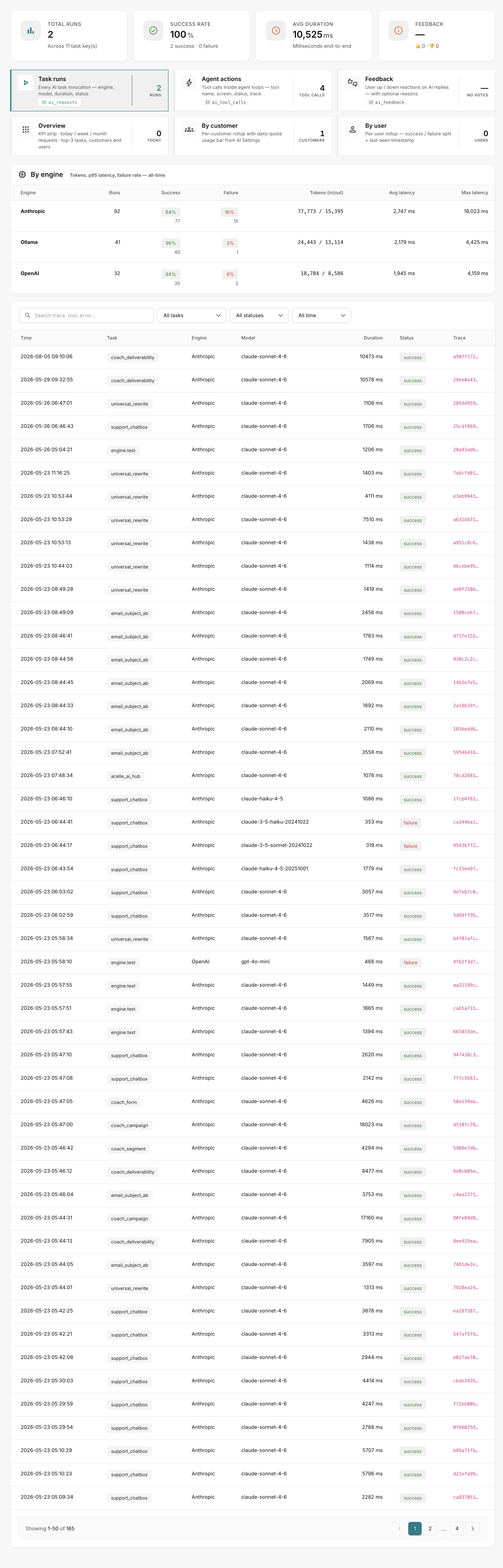 RelyAI → Usage Dashboard
Where P95 latency lives
P95 latency is on the Audit Viewer, not the Usage Dashboard.
Conversations
RelyAI → Conversations lists every multi-turn session. Drill in to replay the messages, tool calls and feedback exactly as they happened.
Audit Viewer
RelyAI → Audit Viewer — tool-call forensics: every agent action, with filters, a status time-series, top failures, P95 latency, and a dedicated destructive-ops filter. Export any filtered view to CSV.
Feedback
RelyAI → Feedback collects up/down ratings from every AI surface, alongside sentiment categorisation.
Self-Improve
RelyAI → Self-Improve surfaces optimization targets based on operational data:
- Failure clustering: Groups tool errors by tool, error class, and knowledge domain across the last 7 days.
- Quality tracking: Monitors flagged hallucinations and sentiment trends.
- Knowledge hot zones: Highlights common support queries where documentation is lacking.
Permissions matrix
RelyAI → Settings → Permissions provides a read-only matrix of tool access:
- Introspection only: Reflects existing AcelleMail role permissions without altering them.
- Transparency: When enabled, customers can access View my permissions to review their access levels.
Related pages
- Agent tools — the actions the audit viewer records
- Feature flags and permissions — hide a surface without stopping logging