
Appearance
Quotas, limits and credits
Three levers keep AI cost in check: per-task rate caps, an optional per-customer daily cap, and moving usage onto customers' own provider keys.
Rate caps
RelyAI → Settings → Quotas & Limits. Each AI task has a rate cap so no one can hammer your provider.
| Cap | Default |
|---|---|
| Per-task rate | 20/minute, 500/hour |
| Per-customer daily | 0 = uncapped |
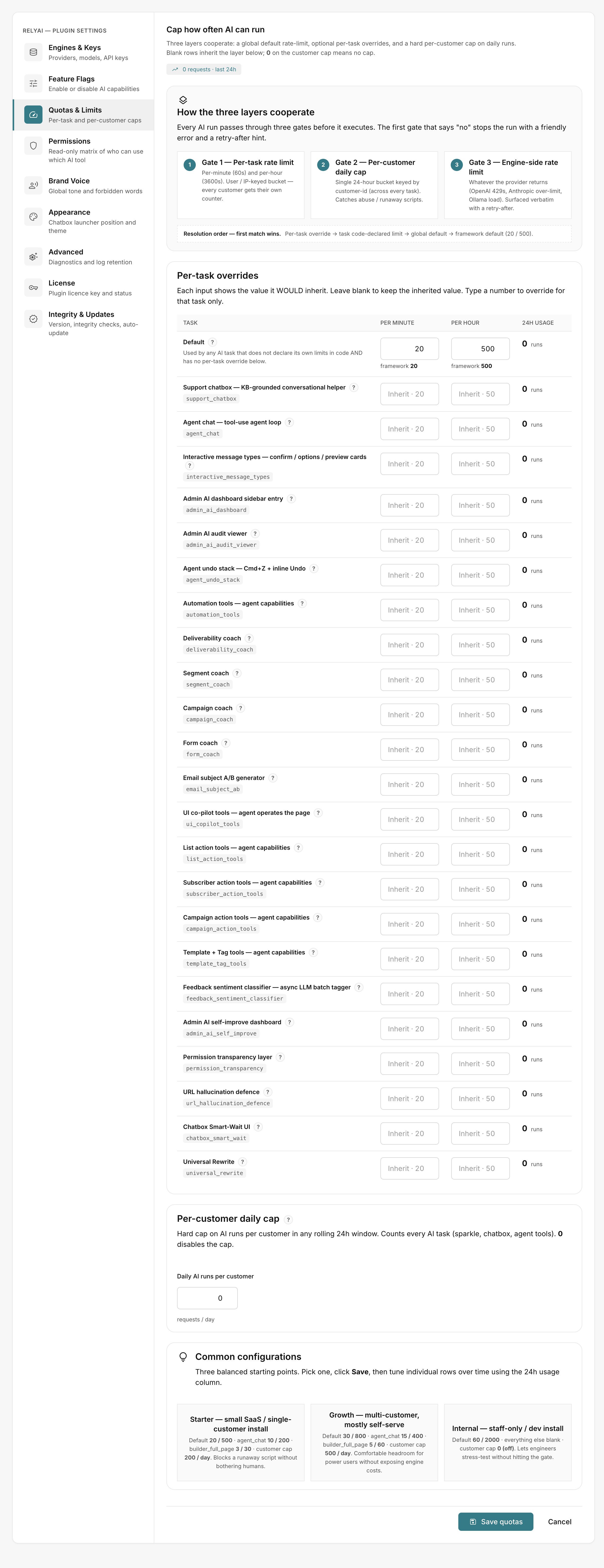 RelyAI → Settings → Quotas & Limits
Configure limits to prevent provider exhaustion:
- Per-task caps: Adjust per-minute and per-hour thresholds to balance speed and protection.
- Per-customer cap: Set a daily maximum to prevent individual accounts from monopolizing capacity.
- Provider backoff: Automatically handles upstream HTTP 429 responses with exponential backoff.
AI Credits
When plan-based AI metering is enabled:
- Customer dashboard: Displays an AI Credits card on the subscription page showing remaining allowance this cycle.
- Unmetered plans: Displays "No AI metering on this plan".
- Native accounting: Integrates directly with AcelleMail's built-in AI credit system.
Move usage onto customers' own keys
Offload API consumption to end-user accounts:
- Enable BYOK: Allow customer API keys under engine settings.
- User configuration: Customers enter their personal provider key under Account → AI.
- Quota isolation: All requests run against the customer's personal API quota instead of the system key.