
Appearance
Installation
Get GeoSync Pro from upload to localised prices: upload the module, activate, grant admin access, enter your license, map countries to currencies.
Prerequisites: a server that meets the Requirements — especially the ionCube Loader — a Full Administrator account, and your GeoSync Pro license key.
1. Upload the module
Copy modules/addons/geosync_pro/ into your WHMCS install, keeping the same path. Use SFTP, your host's file manager, or however you normally deploy WHMCS modules.
2. Activate the addon
Setup → Addon Modules → GeoSync Pro → Activate.
 Setup → Addon Modules → GeoSync Pro
Activation creates the database tables (including the analytics table), deploys the hook loader that switches currencies on client-area pages, and creates a file-integrity baseline. On success:
GeoSync Pro activated successfully. Configure the module in Addons → GeoSync Pro.
Assign access to the Full Administrator role (and any other administrative roles). Without role permissions, GeoSync Pro pages display Access Denied or remain hidden. You can adjust permissions anytime in Configuration → System Settings → Administrator Roles.
3. Enter your license key
Addons → GeoSync Pro → Settings → License Information → paste your key → activate. Currency localisation only runs with an active license. See Licensing for Leased vs Lifetime keys.
On first opening GeoSync Pro after activation, only the License Information form is shown — the Dashboard, Currency and other tabs appear once a valid key is Active.
4. Configure currency mappings
Addons → GeoSync Pro → Currency → turn on Enable Currency Localisation, pick a Default Currency, and add country → currency mappings using ISO 3166-1 alpha-2 codes such as IN, GB or JP.
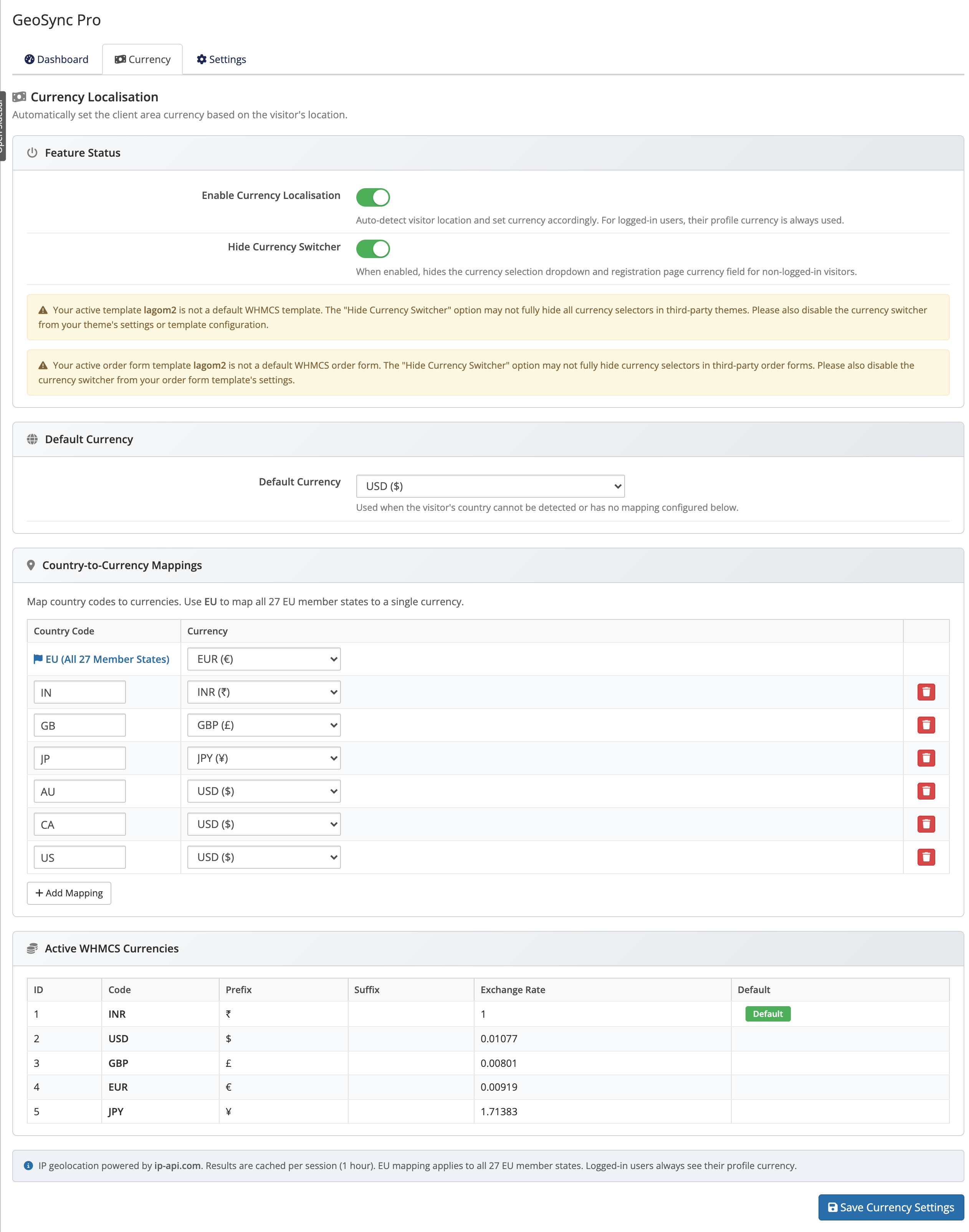 Addons → GeoSync Pro → Currency
The full walkthrough is in Configuration.
5. Verify
Browse your client area in a logged-out or incognito window from a public IP — you should see prices in the currency mapped to your country, or your Default Currency if there's no match.
Currencies must exist in WHMCS
Every currency you map must already exist and be active under Setup → Payments → Currencies, or guests can't be switched to it.