
Appearance
Settings
Plugin settings are managed under Admin → Plugins → Razorpay → Settings (admin login required). Credentials and license keys are configured once and shared across both the Razorpay (direct payment) and Razorpay Subscription gateways.
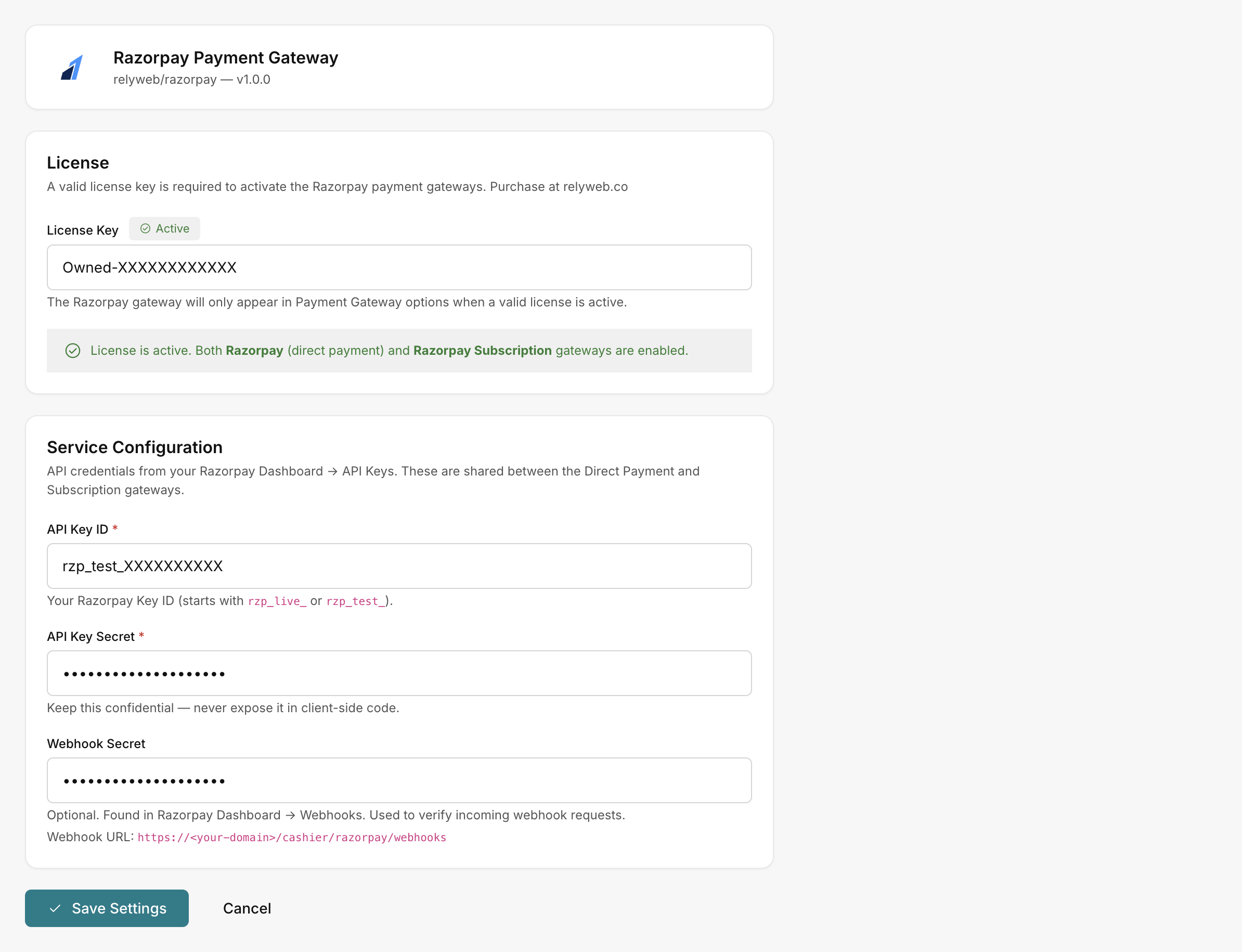 Admin → Plugins → Razorpay → Settings
The page has two cards, followed by a single Save Settings button.
License
Holds your license key and shows its status as a badge:
| Badge | Meaning |
|---|---|
| Active | The license is valid. Both Razorpay gateways are enabled. |
| Not configured | No license key has been entered yet. |
| Invalid | The key was rejected; the gateways will not appear. The help text below the field shows the reason (e.g. "Remote Check Failed"). |
License Key — paste the key from your relyweb.co account.
Active state: Displays "License is active. Both Razorpay (direct payment) and Razorpay Subscription gateways are enabled."
Inactive state: Displays "License is not active. Razorpay gateways will not appear in Payment Gateway options until a valid license is entered and saved."
Validation: Verified via local background checks with
relyweb.co. Temporary network interruptions are tolerated; re-save Settings to refresh status. See Licensing.
Service Configuration
Credentials from Razorpay Dashboard → API Keys, shared by both gateways:
| Field | Notes |
|---|---|
| API Key ID * | Placeholder rzp_live_.... Your Razorpay Key ID (starts with rzp_live_ or rzp_test_). |
| API Key Secret * | Entered as a password. Keep confidential — never expose it in client-side code. |
| Webhook Secret (optional) | From Razorpay Dashboard → Webhooks. Used to verify incoming webhook requests. |
The webhook URL to paste into the Razorpay dashboard is shown inline on this card:
https://YOUR_DOMAIN/cashier/razorpay/webhooksNo sandbox toggle
There is no Sandbox checkbox. rzp_test_ keys run in test mode, rzp_live_ keys run in live mode. Swap the keys and re-save to switch.
Fields marked with * are required. Click Save Settings to persist changes and automatically register active gateways.
Related pages
- Configuration — the end-to-end setup walkthrough
- Licensing — how the license gates the gateways
- Get your API keys — Key ID and Key Secret
- Configure webhooks — set the Webhook Secret and URL
- Errors — what the badges and messages mean